



Using an adjustable workstation can dramatically relieve spinal pressure and improve your day-to-day comfort. By exploring the standing desk benefits for back pain, you can learn how to balance sitting and standing throughout the work day to reduce muscle fatigue and protect your joints. Transitioning to an active desk setup can help you live a healthier, happier, and pain-free workday.
Imagine waking up on a Monday morning feeling completely rested. You brew your morning coffee, sit down at your home office desk, and start checking your emails. By mid-afternoon, a dull, familiar ache begins to creep into your lower back. You shift your weight from side to side. You try slouching, and then you try sitting up perfectly straight. Nothing seems to work. If this sounds like your daily routine, you are not alone in your struggle.
Millions of office workers face this exact back pain battle every single day. Our bodies were simply not designed to sit in a chair for eight hours at a time. Long hours of sitting put a heavy load on our spine, tighten our hip muscles, and drain our daily energy. Fortunately, there is a simple and highly effective way to break this painful cycle. Let’s look closely at how changing the way you work can transform how your body feels.
In this guide, we will explore the physical toll of sitting and how to introduce movement back into your day. We will dive into the science behind adjustable workstations. Finally, we will share practical tips to help you transition safely so you can work comfortably and pain-free.
Key Takeaways
- Relieves Spinal Compression: Standing restores the natural inward curve of your lower spine to take pressure off your discs.
- Activates Core Muscles: Gentle standing engages your abdominal and back muscles to support your posture.
- Boosts Blood Flow: Small movements while standing keep your muscles warm, lubricated, and active.
- Follow the 20-80-2 Rule: For best results, sit for 20 minutes, stand for 8 minutes, and move for 2 minutes.
- Use Supporting Tools: An anti-fatigue mat and supportive shoes prevent leg and foot soreness.
- Listen to Your Body: Rest when you feel tired, as standing too long can also cause muscle strain.
📑 Table of Contents
The Real Cost of Sitting All Day
Before we talk about solutions, we must understand why sitting hurts our bodies so much. When you sit down in a standard office chair, your pelvis tilts backward. This tilt flattens the natural, healthy curve of your lower spine. When this curve disappears, your back muscles must work extra hard to keep you upright. Over time, these overworked muscles grow tired, tight, and incredibly sore.
The Pressure on Your Discs
Your spine has soft cushions called discs between each bone. Sitting increases the pressure on these discs much more than standing or walking. When you slouch forward to look at a computer screen, you pinch the front of these discs. This constant pressure can lead to chronic irritation, stiffness, or even painful disc injuries over time. It is a major reason why sitting for too long feels so draining.
Weak Glutes and Tight Hips
Sitting keeps your hips bent for hours at a time. This causes your hip flexor muscles at the front of your thighs to shorten and tighten. At the same time, your glute muscles in your buttocks essentially go to sleep. When you finally stand up at the end of the day, those tight hip muscles pull hard on your lower back. This muscular imbalance is a primary cause of daily lower back discomfort.
Exploring Standing Desk Benefits for Back Pain
If you want to find lasting relief, exploring the standing desk benefits for back pain is an excellent starting point. Shifting your work style from completely sedentary to active standing can do wonders for your spinal health. Let’s break down exactly how this simple lifestyle change helps your body heal.
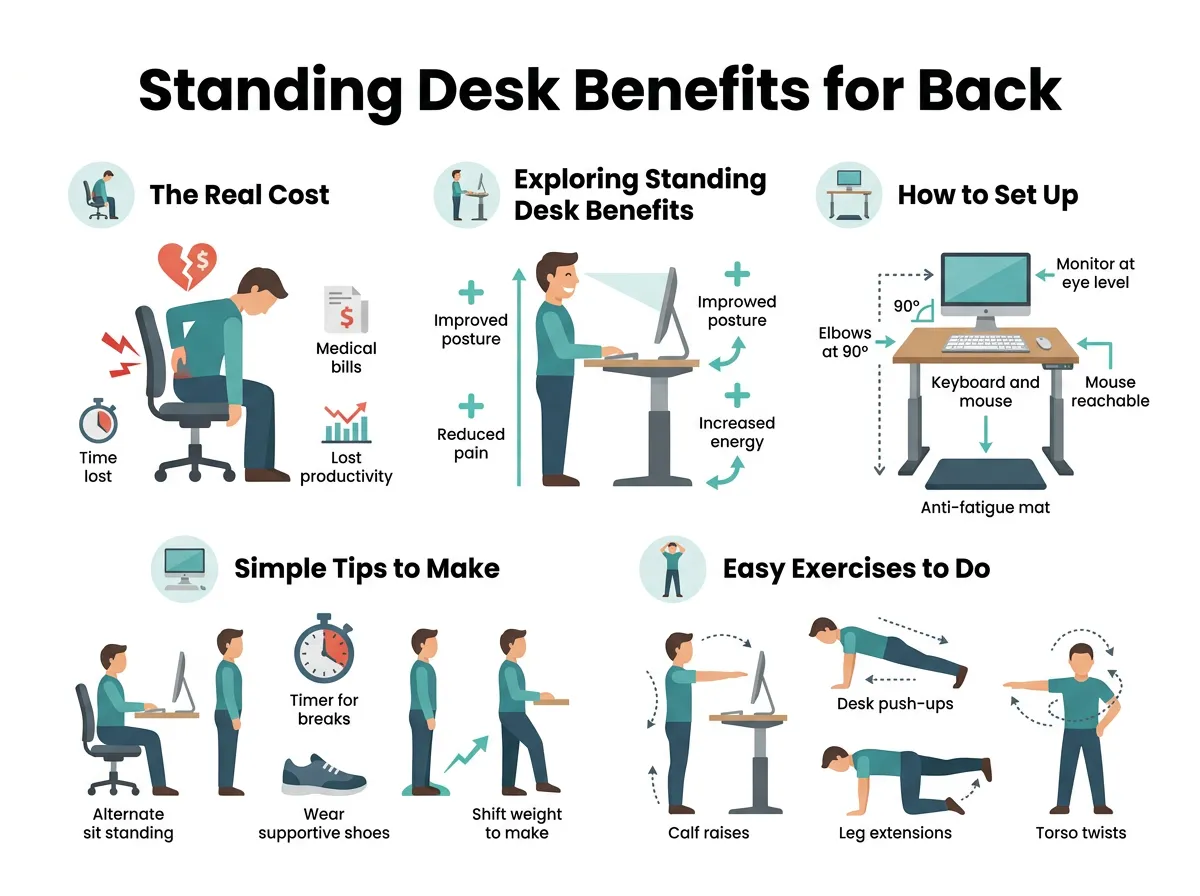
Standing Desk Benefits for Back Pain — key points at a glance
First, standing helps restore the natural shape of your spine. When you stand up, your lower back curves inward naturally. This curve distributes your body weight evenly across your bones and joints. It takes the heavy, uneven pressure off your spinal discs and lets your muscles relax. According to a helpful article on Healthline’s standing desk benefits, using a standing desk can significantly reduce back pain and neck pain after just a few weeks of consistent use.
Second, standing encourages subtle, healthy body movements. You naturally shift your weight from one foot to the other. You might stretch your calves, tilt your pelvis, or tap your feet to some music. These tiny movements keep oxygen and fresh blood flowing to your muscles. This prevents the stiff, frozen feeling that comes from sitting in a chair for hours.
Third, standing keeps your core active. When you stand, your abdominal and back muscles work together to hold you upright. This gentle, effortless activation strengthens your deep core muscles over time. A stronger core acts like a natural corset, protecting your lower spine from everyday strain and injury.
When we look closely at standing desk benefits for back pain, we find that the advantages go beyond physical comfort. Pain drains your mental focus and energy. By reducing physical strain, standing desk benefits for back pain also include sharper focus, better moods, and higher productivity during your workday. You will feel more alert and ready to tackle your tasks.
How to Set Up Your Standing Desk for Pain Relief
Buying an adjustable desk is only the first step. To truly unlock the standing desk benefits for back pain, you need to use your new desk correctly. Simply standing still like a statue for eight hours can cause different types of pain, like sore heels or tight calves. Ergonomic setup is key.
Finding the Right Desk Height
You must adjust your workspace to match your unique body height. Your desk should sit exactly at your resting elbow height. When you type, your elbows should bend at a comfortable 90-degree angle. Your shoulders should remain relaxed and down, not hunched up toward your ears. This prevents upper back and neck strain.
Your computer monitor is also incredibly important. The top of your screen should sit at or slightly below your direct eye level. If your screen is too low, you will bend your neck forward to read. This creates a painful strain on your neck muscles. Ensure your monitor is about an arm’s length away from your face.
The Magic 20-80-2 Rule for Active Movement
The secret to pain relief is not standing all day long. Instead, it is all about movement and frequent variety. To realize the standing desk benefits for back pain, you should adopt a balanced approach. Many movement specialists recommend the 20-80-2 rule to guide your workday.
Try to sit for 20 minutes, stand for 8 minutes, and move or stretch for 2 minutes. This balanced approach ensures your muscles never get too stiff in any single position. It also prevents blood from pooling in your legs. To read more about how posture changes protect your spine, check out this guide on Hinge Health’s standing desk resources.
Simple Tips to Make Standing More Comfortable
Transitioning to a standing desk takes a bit of time. Your body needs to build up stamina in its standing muscles. If you stand for too long right away, you might feel more back pain at first. Here are some simple, practical tips to make the transition smooth and comfortable.
Wear Supportive Footwear
Avoid wearing high heels, stiff boots, or flat, unsupportive shoes while standing at work. Opt for supportive sneakers or shoes with good arch support. If you work from a home office, avoid standing barefoot on hard wood or tile floors. Put on a comfortable pair of indoor shoes to cushion your steps.
Use a High-Quality Anti-Fatigue Mat
An anti-fatigue mat is a wonderful tool. These thick, cushioned mats provide a soft, supportive surface for your feet. They encourage tiny, subconscious micro-movements in your legs and calves. This simple accessory helps you enjoy the standing desk benefits for back pain without hurting your feet or ankles.
Listen to Your Body’s Signals
Pay close attention to how your body feels throughout the day. If your lower back starts to ache or your legs feel heavy, that is your body telling you to sit down. Never force yourself to stand through physical discomfort. Rest when you need to. If you are wondering whether this approach is right for your specific health needs, read this orthopedic advice on Rothman Ortho’s standing desk guide.
Easy Exercises to Do While Standing
You do not have to stand perfectly still at your desk. In fact, adding gentle movements can amplify the standing desk benefits for back pain. Here are three quick exercises you can do while checking emails or attending virtual meetings.
Gentle Calf Raises
Stand tall with your feet hip-width apart. Slowly lift your heels off the ground until you are standing on your toes. Hold for a brief second, then lower your heels back down. Repeat this ten times to pump blood back up your legs and prevent calf stiffness.
Pelvic Tilts
Put your hands on your hips and bend your knees slightly. Gently tuck your tailbone under, flattening your lower back. Then, slowly arch your back slightly in the opposite direction. This small rocking motion keeps your lower spine loose and relieves pressure on your joints.
The Desk Quad Stretch
Hold onto your sturdy desk with one hand for balance. Reach back and grab your left ankle with your left hand. Gently pull your heel toward your glutes until you feel a comfortable stretch in the front of your thigh. Hold for 20 seconds, then switch sides to open up your tight hip flexors.
Conclusion
Investing in your office health is always worth the effort. While sitting in a chair all day can leave you feeling stiff, sore, and tired, exploring the standing desk benefits for back pain offers a practical way to reclaim your comfort. By switching between sitting and standing, you keep your body in motion, support your spine, and boost your daily energy.
Remember, the transition to an active desk is a journey, not a race. Start slowly by standing for just 10 or 15 minutes at a time. Set up your desk to match your body, and always listen to your physical signals. With a little time and consistency, you will find yourself working comfortably and living free from back pain.
Frequently Asked Questions
Can a standing desk completely cure my back pain?
A standing desk is a highly effective tool, but it is not a complete cure on its own. To find lasting relief, you should combine standing with regular movement, core exercises, and proper workplace ergonomics. If you have chronic, severe pain, it is always best to consult a medical professional.
How long should I stand at my desk each day?
You should aim to stand for about 15 to 30 minutes out of every hour. Standing all day long can cause foot and leg fatigue, so the best approach is to cycle between sitting and standing. Listen to your body and sit down whenever you feel tired or sore.
Will using a standing desk cause pain in my feet?
It can cause foot soreness if you stand on a hard floor barefoot or in unsupportive shoes. To prevent this, always wear supportive footwear with good arch support and stand on a cushioned anti-fatigue mat. This helps distribute your body weight evenly and keeps your feet comfortable.
What is the correct height for a standing desk?
Your standing desk should be adjusted to match your elbow height. When your hands rest on your keyboard, your elbows should bend at a comfortable 90-degree angle. Your shoulders should remain relaxed, and your eyes should look straight ahead at the top third of your computer screen.
Do I need to buy an expensive electric standing desk?
No, you do not need to spend a fortune to get the benefits. While electric desks are convenient, manual hand-crank desks or desktop converters work just as well. The most important thing is that the desk can be easily adjusted to your correct standing and sitting heights.
Is it bad to stand still while using my desk?
Yes, standing completely still for long periods can cause muscle fatigue and joint pressure. Try to incorporate small movements like shifting your weight, doing gentle calf raises, or pacing during phone calls. Staying active while standing is key to keeping your joints lubricated and pain-free.
